From Classroom to Keepsake: How to Turn Your Students’ Photos into Adorable Valentine’s Day Cards
With Valentine’s Day fast approaching, I needed to create a type of Valentine that could be completed quickly and sent to parents easily.
I had created digital cards for Mother’s Day and Father’s Day as well as Christmas and they turned out to be huge hits with the parents, so I decided to go with what works for Valentine’s Day too lol.
With technology making it so easy to take and use student photos for projects, I was looking for a unique and sentimental way to use them for our parent Valentines.
The ideas for the cards are from parent Valentine cards I have done in the past. Each student’s adorable photo is the centerpiece for the card, but when each student adds their own personalized touches, that is what really makes the card stand out. They are something parents and caregivers will cherish for years to come!
With having kinders that LOVE using technology and showing off their tech skills, and pre-k students who are not quite as tech savvy, I wanted both digital cards that students could edit in Google Classroom or Seesaw and printable cards that students could color. Both can be downloaded or printed as keepsakes and personalized with student pictures – perfect!
As you may know, I am a huge fan of giving students choice, so I created 6 different designs from which they could choose. If you would like to use these pre-made digital card templates with your students, they are available here.
Use PowerPoint to Insert Student Photos
One of the easiest platforms I have found for inserting student photos in a picture is PowerPoint because it has the crop to shape editing tool. It makes it so easy to resize and shape the photo to the exact size and shape you need. You can use photos you have on file, or students can send a recent photo via Google Classroom, Seesaw, or email. Students are pretty good at taking pictures and selfies nowadays LOL.


Once student photos were inserted in the cards, I saved the digital cards as JPEG picture files and sent them to the students to edit, and printed out the black & white cards to give to students in the classroom.
Students Can Color the Printable Black & White Cards
Students color and personalize the printable black & white cards.
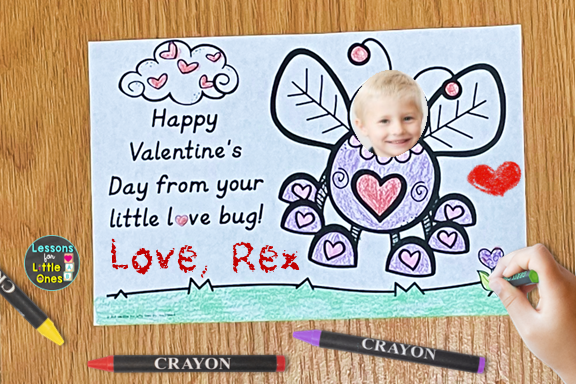
Students Can Edit The Digital Cards in Google Slides
The cards can be edited by students in Google Slides via Google Classroom. Students can write holiday messages and “sign” their names. They can also insert shapes such as hearts, smiley faces, suns, stars, call outs, etc.




Students Can Personalize Their Valentine Cards in Seesaw
Personally, I love having young students use Seesaw to edit their cards because they can use the drawing tools to sign their names and draw pictures, use the text tool for messages, and my favorite part is they can use the record option to record a special Valentine’s message that the card recipient can download and keep! How special!


If you would like to use these digital Valentine’s Day card templates with your students, click here to download them from my Teachers Pay Teachers store.

You may also like:
Handmade Valentine’s Day Crafts from Students to Parents, Caregivers
Valentine’s Day Student Gift Ideas & Gift Tags
Pin it for later!